
PromptBaz tools
Turn an image into a reusable AI prompt
Upload a photo and get a written description of what it actually shows — subject, scene, framing, light, materials, colour and mood — as prompt text you can edit, copy and reuse. It is a careful visual translation, not a way to recover the original prompt behind a picture.
- JPG, PNG or WebP · up to 10 MB
- Free account · 5 credits a month
- Uploads stay private
Image to prompt
to use this tool — 5 AI tool credits every month.
Prompt length
Focus
One credit is used only when a prompt comes back. The image is read once and stays private.
Generated prompt
—Example
A real example: studio photo in, prompt out
This is one image run through the tool with Detailed length and Product focus. The prompt below is the untouched result, not a hand-written sample.
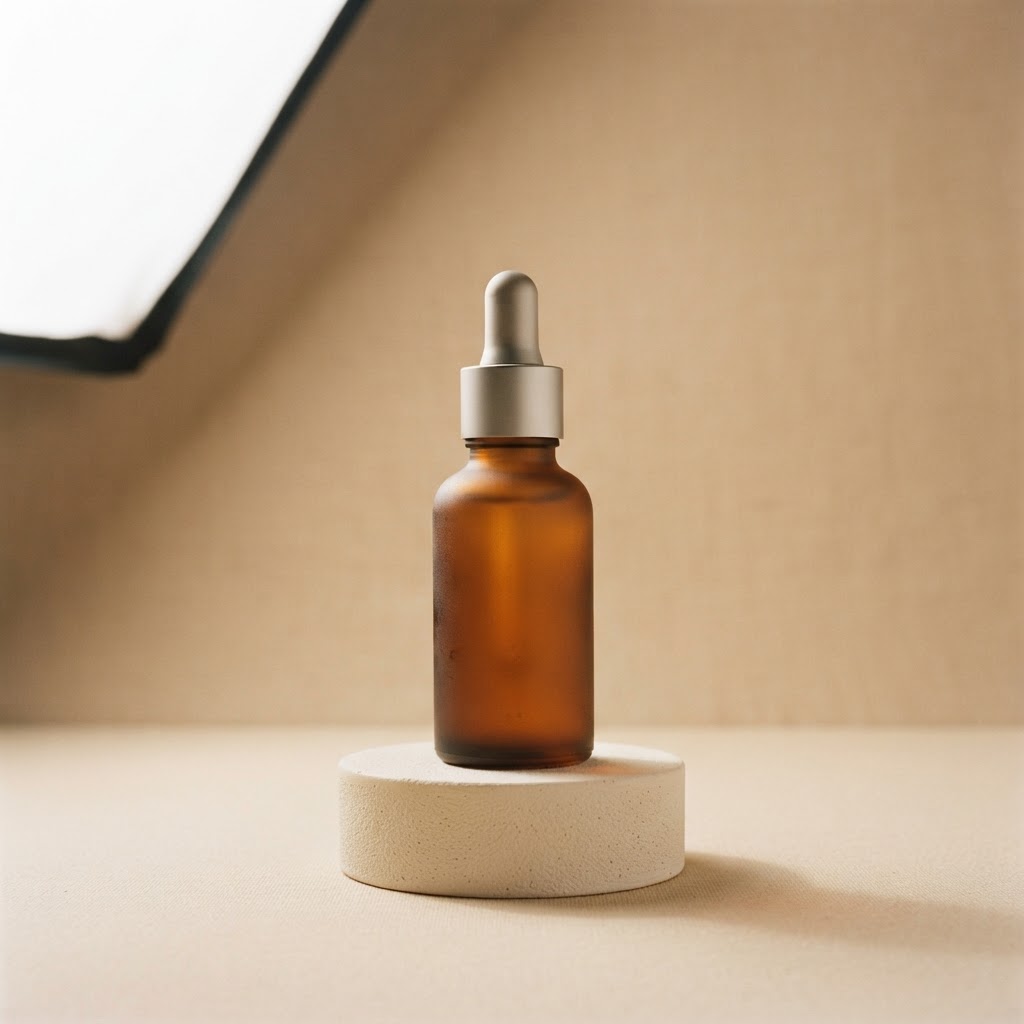
Example · generated prompt
A professional product photograph of an amber frosted glass dropper bottle centered on a circular, textured beige pedestal. The bottle features a metallic silver dropper cap and has a soft, matte finish that suggests skincare or cosmetic contents. It is placed against a minimalist, seamless beige backdrop that provides a clean and neutral setting. The lighting is soft and diffused, originating from the upper left to cast a subtle, gentle shadow beneath the pedestal, highlighting the contours of the bottle. The composition is symmetrical and balanced, with the camera at eye level for a direct, polished presentation. The color palette consists of warm, earthy, and muted neutral tones, evoking a serene and premium aesthetic. The overall mood is sophisticated, clinical, and calm, typical of high-end beauty brand imagery. Every surface detail is crisp, capturing the clean edges of the pedestal and the smooth, frosted texture of the glass.
Detailed length · Product focus · no target model. Results vary with the image and the settings you choose.
Use cases
What an image to prompt workflow is good for
The tool is most useful when you already have a picture whose look you want to repeat, adapt or brief someone else on.
01
Reference photos and moodboards
Turn a saved reference into words, so a look you like stops being a feeling and becomes a prompt you can adjust, share and reuse.
02
Product and ecommerce visuals
A photo to prompt pass over a product shot captures surface, styling, background and light — handy when you want new angles that still feel like the same campaign.
03
Portraits and people
Describe pose, framing, wardrobe and lighting so a reshoot or a new portrait set keeps the same mood, without guessing at the original setup.
04
Places, interiors and landscapes
Write down terrain, weather, time of day and depth once, instead of re-explaining the same scene every time you generate a variation.
05
A prompt library that starts from images
Use the output as the first entry for every picture you collect, then tag it in PromptBaz and keep the visual language of a project consistent.
06
Editing and variation briefs
An image to text prompt description is also a clear brief for retouching, background changes, inpainting or a style-matched variant of the same shot.
How it works
How to generate a prompt from an image
Four steps, and you can stop and edit at any point.
- 1
Upload your image
Drop in a JPG, PNG or WebP up to 10 MB. You see a preview straight away and can replace or remove it before you generate anything.
- 2
Choose length and focus
Brief gives you a line, Balanced suits most generators, Detailed adds camera, material and mood. Focus points the description at a product, portrait, landscape or cinematic look.
- 3
Generate the prompt
The tool reads the visible content of the image and writes the prompt. A credit is only used when a result comes back.
- 4
Edit, copy, regenerate
The result is editable text. Keep the parts that fit, rewrite the rest, copy it into your generator, or regenerate for a different reading of the same image.
Features
What you get from the image to prompt generator
Focused on the details that actually steer an image model.
01
Visible detail, not guesses
Subject, framing, light direction, surface and mood are described from the pixels. The tool is instructed not to invent brands, people or objects it cannot see.
02
Three lengths, five focuses
The same picture can become a one-line caption or a full production description, aimed at the kind of image you want to make next.
03
Optional target model
Tailor the wording toward Midjourney, Flux, DALL·E, Nano Banana or another generator, without adding flags or weights you did not ask for.
04
Editable, copyable result
Everything lands in a normal text field with a copy button and a regenerate action, so the output fits your workflow instead of locking you in.
05
Private uploads
Your image is stored privately and read through a short-lived signed link. It is never listed, shared or attached to a public prompt.
06
Honest credit accounting
One credit per successful prompt, five a month on a free account, with the reset date always visible above the tool.
Good to know
Practical guidance and limits
What this tool does well, and what it will not do for you.
What it does well
Clear product shots, portraits, interiors, architecture, landscapes, fashion references and campaign stills give the model concrete things to name. Even, well-lit images with one main subject produce the most stable descriptions.
What it cannot do
It does not reverse-engineer the prompt used to make the image, it cannot recreate the original exactly, it does not extract text or run OCR, and it will not identify people. Treat the output as a strong starting point, not a receipt.
Use it as a reverse image prompt, carefully
A reverse image prompt built from a description works well for style, light and composition. It will not reproduce a specific person, logo or product exactly, and it is not an image search or attribution tool.
Choose the focus that matches your goal
Product focus spends its words on surfaces and styling, cinematic on lens feel and grade, portrait on pose and framing. Matching the focus to the picture you want next gives a more useful prompt than always leaving it on General.
Uploads and retention
Images are uploaded to private PromptBaz storage and read once through a signed link that expires after 15 minutes. Nothing is published, and the file is never attached to a listing in the prompt library.
Only upload what you have the right to use
Descriptions of other people's photographs are generally fine for study and style work, but check the licence before you generate commercial imagery that leans on someone else's composition.
FAQ
Image to prompt questions
The things people ask before their first upload.
What is image to prompt?
Image to prompt is the step of turning a picture into written prompt text. The tool describes the visible subject, scene, composition, lighting, materials, colour and mood so you can reuse that visual direction in an image generator.
How do I generate a prompt from an image?
Upload a JPG, PNG or WebP, pick a length and a focus, then press Generate. The result appears in an editable field where you can copy it, change the wording or regenerate.
Does it recover the original prompt behind an image?
No. No tool can reliably recover the exact prompt used to make a picture, because many different prompts can produce the same image. This tool writes a new prompt that describes what is visible, so it is a starting point rather than a copy of the original.
Is image to text prompt the same as OCR?
No. OCR reads letters printed in an image. This tool describes the scene itself — objects, composition, light and mood — which is what an image model needs. If you need the words inside a screenshot, use an OCR tool instead.
Which images work best?
Clear, well-lit pictures with a recognisable subject: product photos, portraits, interiors, landscapes, fashion references and campaign stills. Very dark, very blurry or extremely busy images give the model less to work with, and the prompt will be vaguer.
What do Brief, Balanced and Detailed change?
Brief keeps the prompt to a line or two for quick exploration. Balanced lands around 60 to 90 words, which suits most generators. Detailed runs longer and adds camera angle, materials, colour and mood for a faithful recreation.
What does the Focus setting change?
Focus decides which details get the most attention. General balances the whole scene, Product concentrates on surfaces and commercial lighting, Portrait on pose and wardrobe, Landscape on terrain and weather, and Cinematic on framing and colour grade.
Can I use the result for product photography?
Yes, that is one of the strongest uses. A photo to prompt description of a product shot names the surface, background, reflections and light, which is exactly the information you need to generate variations that stay on brand.
Can it work as a reverse image prompt for Midjourney or Flux?
It can. Choose the target model to nudge the wording toward that generator's conventions, then paste the result into your prompt box. It describes the image rather than pointing at it, so the model receives workable text instead of an unreachable reference.
Are my uploads public?
No. Images go to private storage and are read through a signed link that expires after 15 minutes. Nothing you upload appears in the PromptBaz library, on a profile or in search results.
Do I need an account, and how do credits work?
You need a free account to generate. Free accounts get five AI tool credits each calendar month, shared between both PromptBaz tools, and the balance resets on the first of the next month. A credit is only deducted after a successful result; failed requests are free.
PromptBaz tools
Start from a picture you already like
Upload a reference and get a prompt you can edit, tag and reuse — then keep it in your library so the look is never lost.